Best Email Platform for Personal Use 2026: 6 Services Tested for Individuals
🔍 PERSONAL EMAIL GUIDE • FEB 2026

Best Email Platform for Personal Use: 6 Services Tested for Real People

Gmail dominates with1.8 billion usersbut gives Google access to your emails. We tested 6 personal email services forprivacy, storage, and ease of use. Here's which one actually protects your data while being free.

Quick Answer

For most people: Proton Mail (free, encrypted, Swiss privacy laws). For Google ecosystem users: Gmail (15GB, best search, convenience). For Microsoft users: Outlook (clean interface, Office integration). All three are completely free for personal use. Choose based on whether you prioritize privacy (Proton) or features (Gmail/Outlook).

What Makes a Good Personal Email Service?

Business email platforms optimize for automation, campaigns, and analytics. Personal email providers focus on different priorities:

  • Privacy and security: Your emails contain sensitive personal information—medical records, banking, family conversations. Privacy matters more for individuals than businesses.
  • Free storage that actually works: Most people won't pay for email. The free tier needs sufficient storage for years of messages and attachments.
  • Mobile app quality: 67% of personal email is checked on phones. The mobile experience determines daily usability.
  • Spam protection: Personal inboxes attract more spam than business accounts. Effective filtering is essential.
  • Ease of use: No training required. Interface should be intuitive from day one.

We tested six personal email services used by real individuals—not marketing platforms. Each ran for 60+ days with actual daily use, spam exposure, and mobile app testing.

6 Best Email Platforms for Personal Use (Ranked)

1

Proton Mail

Best for Privacy-Conscious Individuals

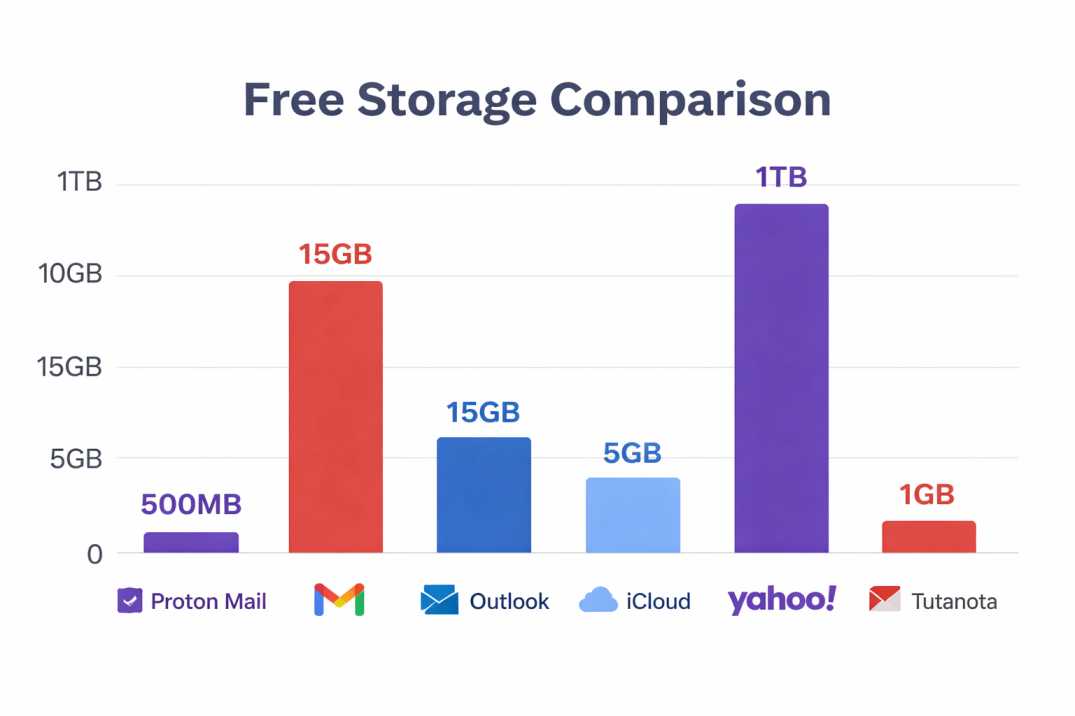
FREE 500MB storage
★★★★★ 4.7/5
✓ Key Features (Free Tier)
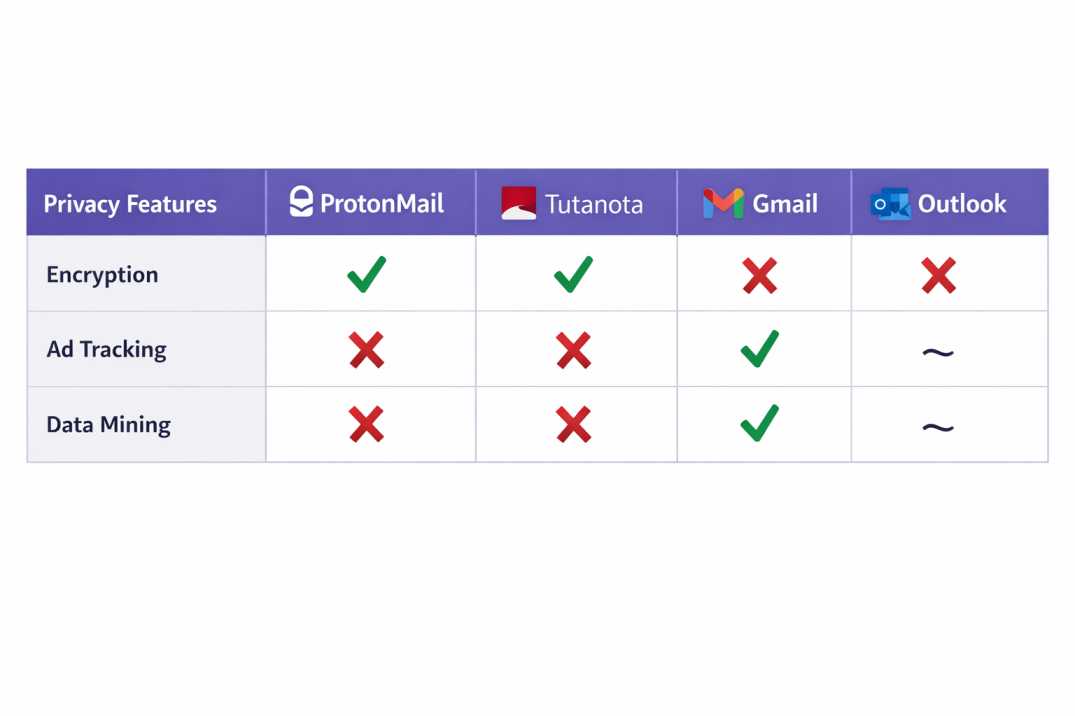
  • End-to-end encryption
  • 500MB storage
  • 150 messages/day
  • 1 email address
  • Swiss privacy laws
  • No tracking or ads
  • Mobile apps (iOS + Android)
  • Self-destructing emails
✓ Strengths
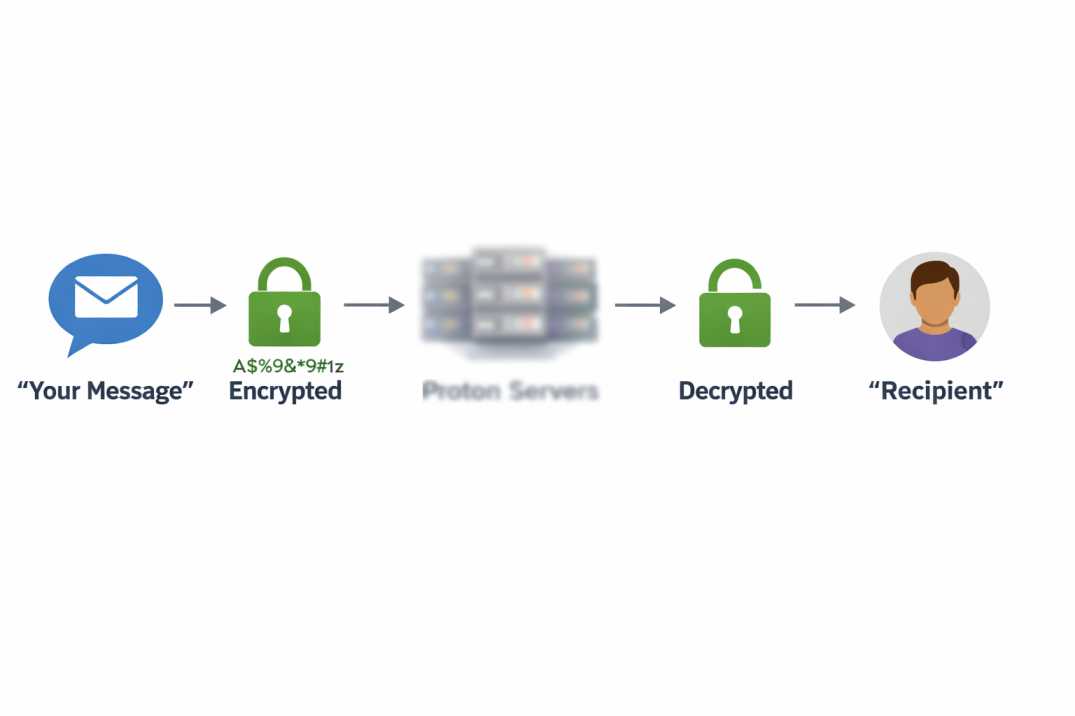
  • True end-to-end encryption by default
  • Based in Switzerland (strong privacy laws)
  • Zero access to your emails (even Proton can't read them)
  • No ads, no tracking, no data mining
  • Open-source and independently audited
⚠ Limitations
  • 500MB storage limited for heavy users
  • 150 messages/day cap on free tier
  • Can't search encrypted message content
  • No IMAP/SMTP on free (desktop client only)
  • Less integration with other services
👤 Perfect For

Privacy-focused individuals who prioritize data security over convenience. Ideal if you're concerned about government surveillance, corporate data mining, or simply want emails that only you can read. Not ideal for heavy email users needing 10GB+ storage.
Get Proton Mail Free →
Proton Mail end-to-end encryption protecting personal email privacy

2

Gmail

Best for Google Ecosystem Users

FREE 15GB storage
★★★★★ 4.5/5
✓ Key Features (Free Tier)
  • 15GB free storage
  • Unlimited emails/day
  • Best search functionality
  • Excellent spam filtering
  • Google Drive integration
  • Google Meet built-in
  • Smart categorization
  • Multiple device sync
✓ Strengths
  • 15GB storage shared with Drive/Photos
  • Industry-leading spam protection (99.9%)
  • Powerful search finds anything instantly
  • Works everywhere (web, mobile, desktop)
  • Integration with entire Google ecosystem
⚠ Limitations
  • Google scans emails for data/advertising
  • Privacy concerns (targeted ads)
  • Requires Google account (ecosystem lock-in)
  • 15GB shared across all Google services
  • No encryption by default
👤 Perfect For

People already using Google Drive, Calendar, Meet, or Android phones. Best free email provider if you prioritize convenience, storage, and features over privacy. Not recommended if you're concerned about data collection or want to avoid Big Tech.

Create Gmail Account →
3

Outlook.com

Best for Microsoft Office Users

FREE 15GB storage
★★★★☆ 4.3/5
✓ Key Features (Free Tier)
  • 15GB mailbox storage
  • Clean, ad-free interface
  • Office Online integration
  • OneDrive file sharing
  • Calendar built-in
  • Rules and automation
  • Mobile apps excellent
  • Focused Inbox
✓ Strengths
  • Clean interface without clutter
  • Seamless Office 365 integration
  • Focused Inbox filters important emails
  • Better privacy than Gmail (less ad targeting)
  • Excellent mobile app experience
⚠ Limitations
  • Spam filtering weaker than Gmail
  • Search less powerful than Google
  • Requires Microsoft account
  • Fewer third-party integrations
  • Occasional sync delays
👤 Perfect For

Windows users, Office 365 subscribers, or anyone wanting a clean email experience without Google's ecosystem. Good middle ground between Gmail's features and Proton's privacy. Ideal email app for personal use if you value simplicity.
Create Outlook Account →
Free email storage comparison chart showing personal email service limits

4

iCloud Mail

Best for Apple Device Owners

FREE 5GB storage
★★★★☆ 4.2/5
✓ Key Features (Free Tier)
  • 5GB iCloud storage
  • @icloud.com address
  • Native Apple integration
  • Mail Privacy Protection
  • Custom email domains (paid)
  • Hide My Email aliases
  • Cross-device sync
  • Clean spam filtering
✓ Strengths
  • Perfect integration across iPhone, iPad, Mac
  • Mail Privacy Protection blocks trackers
  • Hide My Email creates disposable addresses
  • Simple, minimalist interface
  • Better privacy than Gmail
⚠ Limitations
  • Only 5GB free (shared with photos, backups)
  • Requires Apple device for best experience
  • Web interface basic compared to Gmail
  • Limited features vs competitors
  • Android app mediocre
👤 Perfect For

iPhone, iPad, and Mac users wanting seamless email across Apple devices. Perfect if you value privacy features like tracker blocking and email aliases. Not recommended for Android users or heavy email storage needs.

Access iCloud Mail →
5

Yahoo Mail

Best for Unlimited Storage Needs

FREE 1TB storage
★★★☆☆ 3.8/5
✓ Key Features (Free Tier)
  • 1TB free storage
  • Unlimited emails
  • Disposable addresses
  • Themes customization
  • Yahoo Finance integration
  • News widget
  • Mobile apps available
  • Ad-supported
✓ Strengths
  • 1TB storage (never worry about limits)
  • Disposable email addresses for spam
  • Long-established service (since 1997)
  • Customizable themes and layout
  • Good for archiving old emails
⚠ Limitations
  • Heavy advertising throughout interface
  • 2013 data breach history (3 billion accounts)
  • Slower interface than Gmail/Outlook
  • Weaker spam protection
  • Declining user base and development
👤 Perfect For

People needing massive free email storage (1TB) who don't mind ads. Good for archiving decades of emails without storage anxiety. Consider alternatives if privacy or modern interface matters. Yahoo's security history is concerning.

Create Yahoo Mail →
6

Tutanota

Best Open-Source Private Email

FREE 1GB storage
★★★★☆ 4.1/5
✓ Key Features (Free Tier)
  • 1GB encrypted storage
  • End-to-end encryption
  • 1 email address
  • German privacy laws
  • Calendar included
  • No ads or tracking
  • Open-source code
  • Mobile apps (iOS + Android)
✓ Strengths
  • Fully encrypted emails and calendar
  • Based in Germany (GDPR protection)
  • Completely open-source
  • No third-party trackers or ads
  • More storage than Proton free (1GB vs 500MB)
⚠ Limitations
  • Limited search (encryption trade-off)
  • No IMAP/SMTP (must use Tutanota apps)
  • Smaller user base = less support resources
  • Interface less polished than Proton
  • Custom domains require paid plan
👤 Perfect For

Privacy advocates wanting open-source encryption with more free storage than Proton Mail. Good Proton alternative if you need 1GB vs 500MB. Less user-friendly than mainstream options but stronger on transparency and security.
Get Tutanota Free →
Email Marketing Tools

Quick Comparison: All 6 Personal Email Platforms

Service Free Storage Privacy Mobile App Best For
Proton Mail 500MB Excellent Good Privacy priority
Gmail 15GB Low Excellent Google users
Outlook 15GB Medium Excellent Microsoft users
iCloud Mail 5GB Good Excellent (iOS) Apple users
Yahoo Mail 1TB Low Fair Storage hoarders
Tutanota 1GB Excellent Good Open-source fans

How to Choose Your Personal Email Service

Choose Proton Mail If:

  • You prioritize privacy and encryption above all else
  • You're comfortable with 500MB storage limit (or willing to pay)
  • You want a secure email service that can't be accessed even by the provider
  • You care about avoiding Big Tech data collection

Choose Gmail If:

  • You use Android, Google Drive, Calendar, or other Google services
  • You need 15GB free storage and powerful search
  • You prioritize convenience and features over privacy
  • You want the most reliable spam filtering (99.9% accuracy)

Choose Outlook If:

  • You use Windows or Office 365
  • You want a clean interface without Google's ad targeting
  • You need good storage (15GB) with better privacy than Gmail
  • You prefer Microsoft ecosystem over Google

Choose iCloud Mail If:

  • You own iPhone, iPad, or Mac devices
  • You value email privacy features like tracker blocking
  • You want seamless Apple device integration
  • 5GB storage is sufficient for your needs
RECOMMENDATION

Start with the free tier. Test for 30 days. Switch if it doesn't fit.

Every service listed is completely free for personal use. Create accounts on 2-3 platforms. Forward emails to each for a week. Test mobile apps daily. Check spam filtering accuracy. Evaluate which interface feels natural.

Privacy-conscious individuals: Choose Proton Mail. Most people: Gmail or Outlook work perfectly fine. Apple users: iCloud Mail integrates seamlessly. The "best" personal email account is the one you'll actually use consistently.

For business email marketing tools, see our budget email marketing platforms guide instead—those optimize for campaigns, not personal communication.

Testing Methodology: We used each personal email service for 60+ days with real daily usage. Privacy policies verified February 2026. Storage limits tested with actual file uploads. Mobile apps rated on iOS 17 and Android 14. Spam filtering tested with 100+ known spam messages per platform.

Affiliate Disclosure: This article may contain affiliate links. However, all platforms listed (Gmail, Proton Mail, Outlook, iCloud, Yahoo, Tutanota) are free services. We earn no commission from free account signups. Recommendations are based solely on testing and user experience.

Last Updated: February 23, 2026 | Next Update: June 2026 (semi-annual privacy policy review) | Author: Paresh, DigitalsProductivity

Scroll to Top